Compare content with document task
Last updated: June 22, 2026
What it does
The Compare content with document task automatically checks whether the case data entered in Ondorse (the declarative data in the Content tab) matches the information found in an uploaded document. When the task runs as part of your workflow, it extracts data from the document and flags relevant fields where the document and your Content data disagree.
This lets you confirm that what's declared in a case is backed by the supporting documentation, so you can make sure you're compliance bullet proof and audit-ready (e.g. for the ACPR).
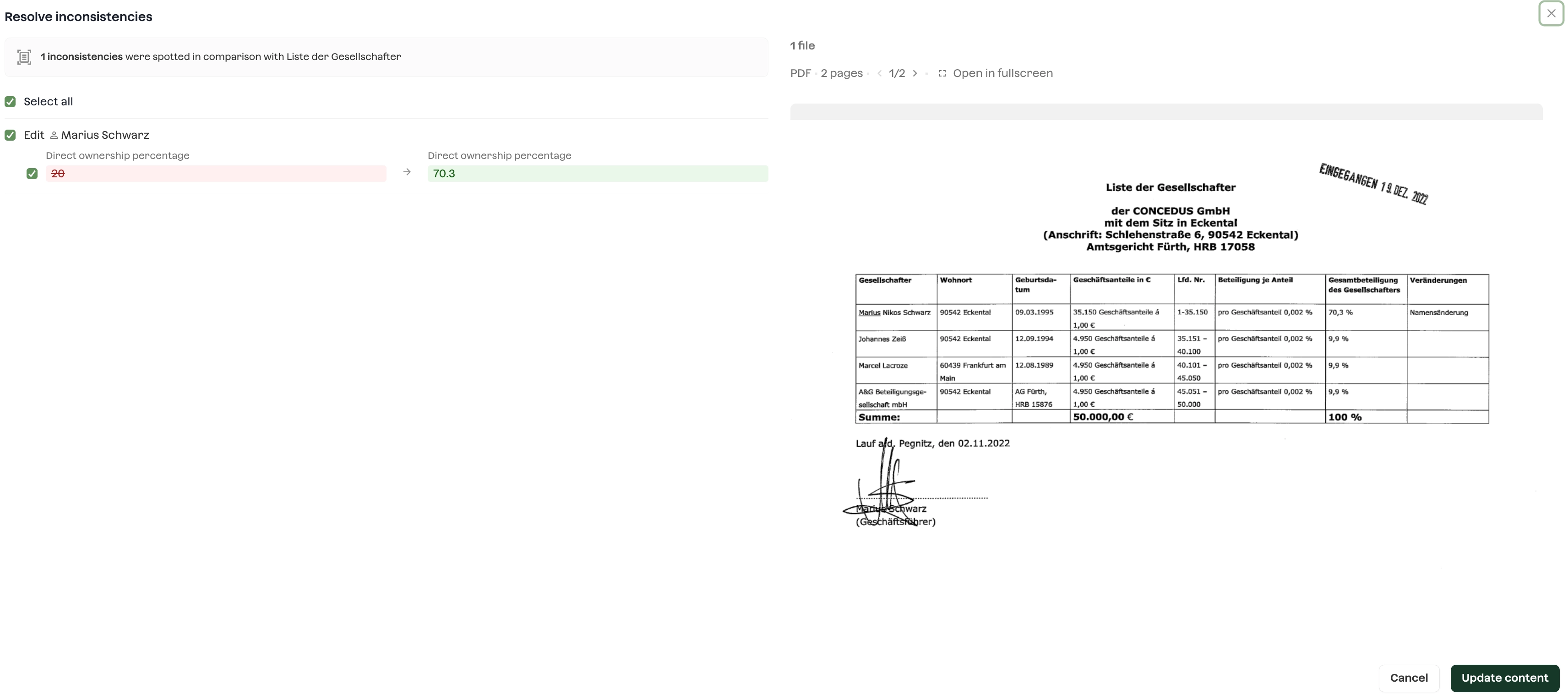
How it works
The Compare content with document task runs on the relevant document(s) in the case workflow.
If the task detects discrepancies the task is in needs action
Clicking Resolve opens a modal that shows the differences between the document and your Content data, displayed side by side like a diff.
Clicking Confirm accepts the document's value and overwrites the corresponding field in Content.
The changes you accept are recorded in the case Activity log.
Who this is for
The task is most valuable for:
Highly regulated clients who need to demonstrate coherence between declared data and the underlying documents. This is a pure compliance need.
Clients with entities outside France, where UBO and company data isn't easily available from registries, so the document is the primary source of truth.
Coverage and limitations
Please read these before relying on the task in production.
Scoped to UBO extracts. The task currently works on UBO extraction from documents exclusively
Supported countries. Extraction is tested and supported for: 🇧🇪 Belgium, 🇪🇸 Spain, 🇳🇱 Netherlands, 🇮🇹 Italy, 🇩🇪 Germany.
Shareholder graphs vary. Because graphs come in many formats, reliability on non-standard graphs is lower.
Beta / test phase recommended. This is an AI feature and is not considered fully production-ready until validated on a large enough set of documents. We strongly recommend a test phase on your own document set. Extracted data can occasionally be incorrect, so a human review step is expected.
Getting started
If you'd like to trial Compare content with document on your account, contact your Ondorse point of contact or reach out via support. We'll help you set up a test phase and review results together before switching it on for live cases.